16-track sequencer · Yamaha MODX

MODXNO

The sequencer your MODX never had. Plug it in over USB, and your sixteen parts land on a timeline you can actually see. Compose, edit, mix — and Save keeps everything: the notes and the MODX sounds.

16 tracks, 16 MODX parts One USB cable Arrangement timeline Note editor Capture Tight Full MODX mixer 2227 MODX sounds in a menu Export as MP3 Save keeps the Performance 16 tracks, 16 MODX parts One USB cable Arrangement timeline Note editor Capture Tight Full MODX mixer 2227 MODX sounds in a menu Export as MP3 Save keeps the Performance
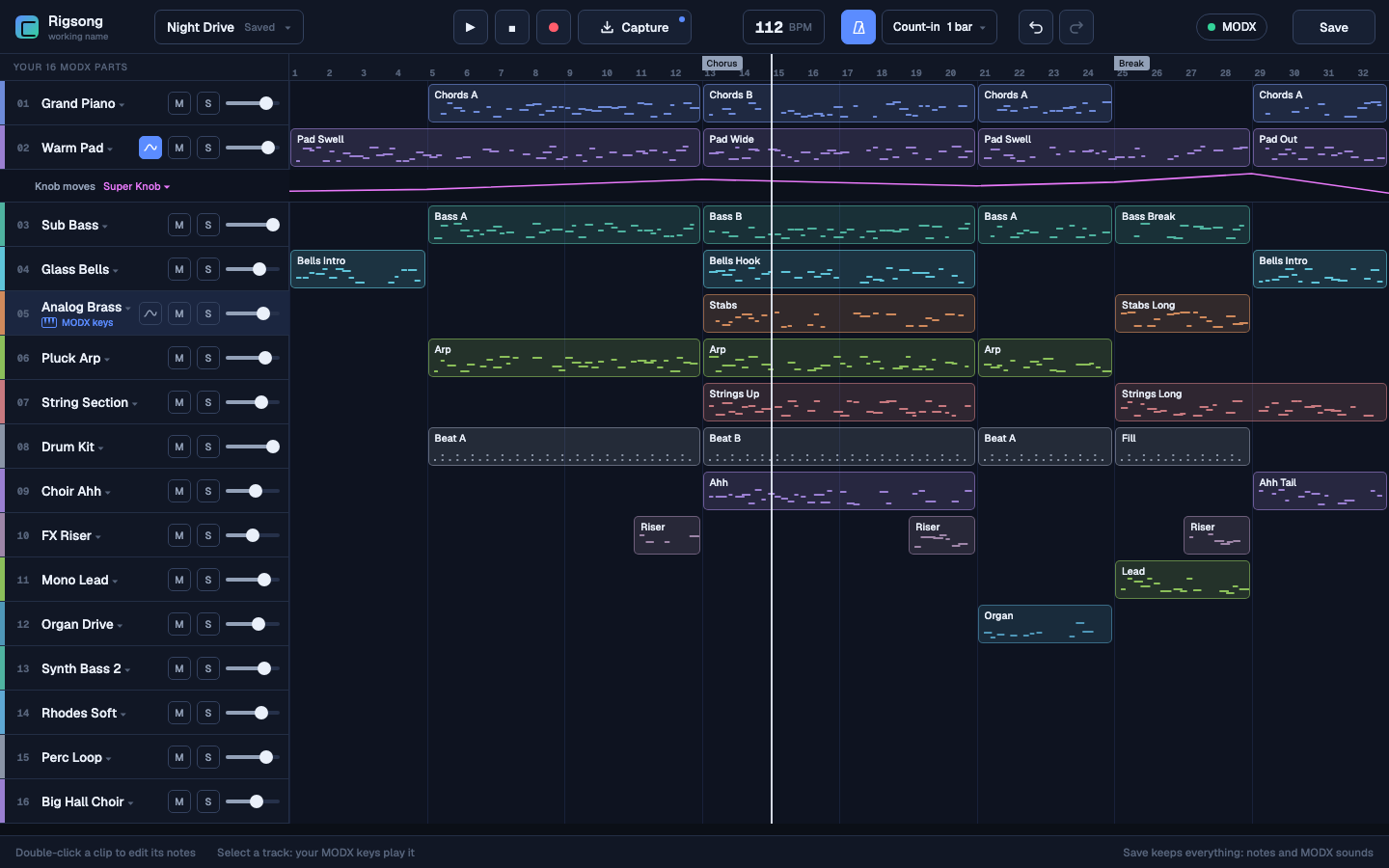
MODXNO arrangement view: sixteen MODX parts on a timeline
The whole song, sixteen parts, one screen.
Your 16 MODX parts

Sixteen tracks.
Sixteen parts. Same thing.

Track 1 is Part 1, on MIDI channel 1. No routing page, no mapping to learn. MODXNO reads the names and the families straight from your MODX, so your Performance arrives already labelled and colour-coded.

PianoKeyboardOrganGuitarBassStringsBrassWoodwindSyn LeadPadSyn CompMalletDrumsSound FXMusical FXEthnic
The sounds

Every sound in your MODX,
four clicks away.

No scrolling through the synth's little screen, no writing bank numbers on a sticky note. Click a track's name and the whole factory library opens as a menu: family, then sub-family, then the sound. Pick one and the MODX changes part straight away — you hear it as you choose.

2,227Factory Performances, all of them in the menu
16Families, each with its own sub-families
128General MIDI sounds too — Strings, then Cello
0Trips to the synth's screen
Note editor

Keys you
already know.

Double-click a clip and the editor opens underneath, with the song still in view. Mouse and keyboard follow Ableton Live 12, so your hands keep their habits. C3 is MIDI note 60 — the same note Yamaha and Ableton call C3.
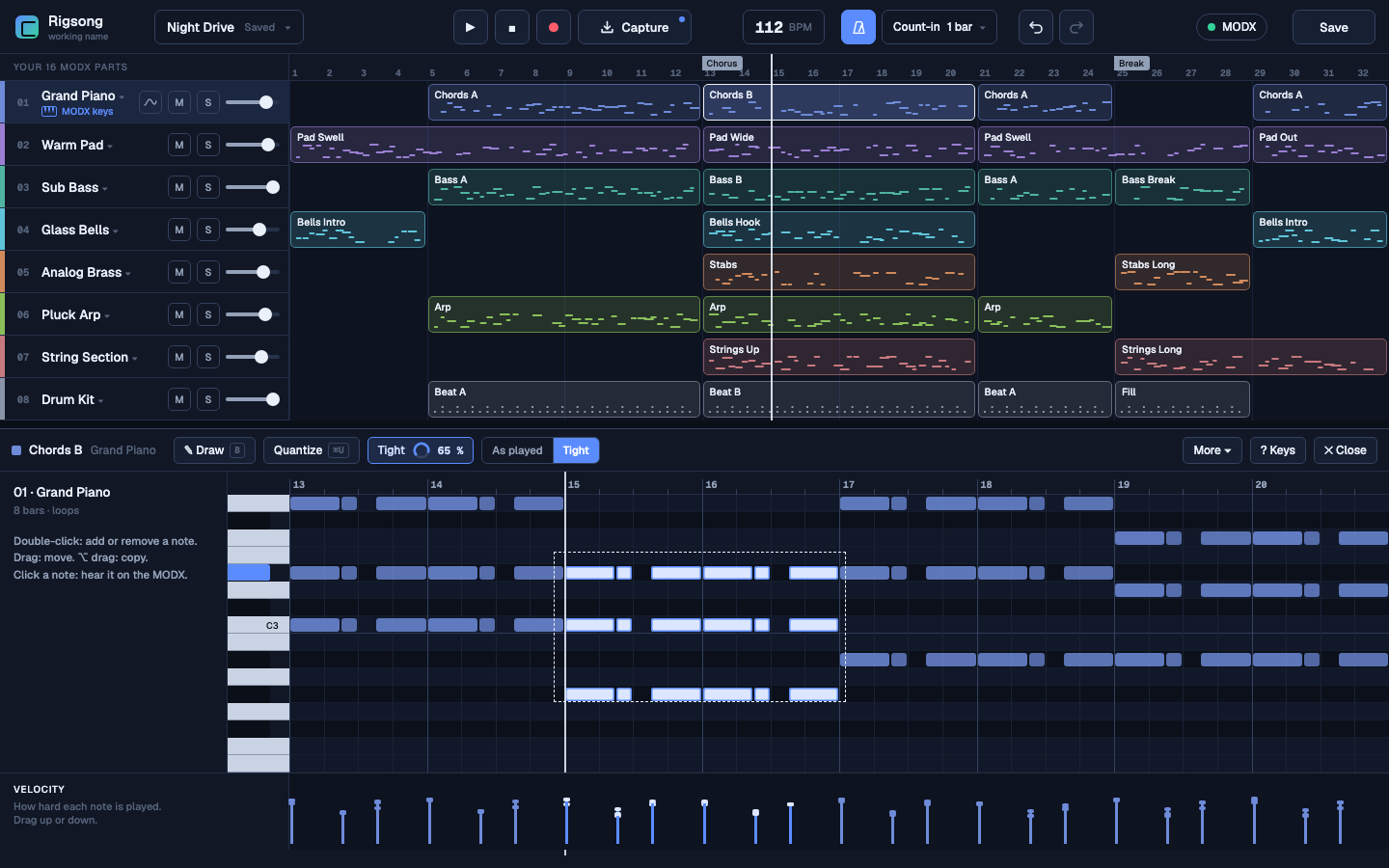
  • Draw, move, duplicate, delete, and a velocity lane under the grid.
  • Click a note to hear it on the MODX itself.
  • Loop a clip: turn Loop on, drag the bar in the ruler, stretch the block.
MODXNO note editor, with the velocity lane
The editor opens under the song, never over it.
Double-clickAdd or remove a note
BDraw mode
⌥ dragDuplicate
⌘DDuplicate
⌘UQuantize
⌘ASelect all
⌘C / ⌘VCopy, paste
← →Move the notes
⇧ ↑ ↓One octave
⌘1 / ⌘2Narrower, wider grid
Capture & Tight

It was already
listening.

You play something good and you never pressed Record. Press Capture instead: the last thing you played drops into the selected track, rounded to whole bars, looping on its own.
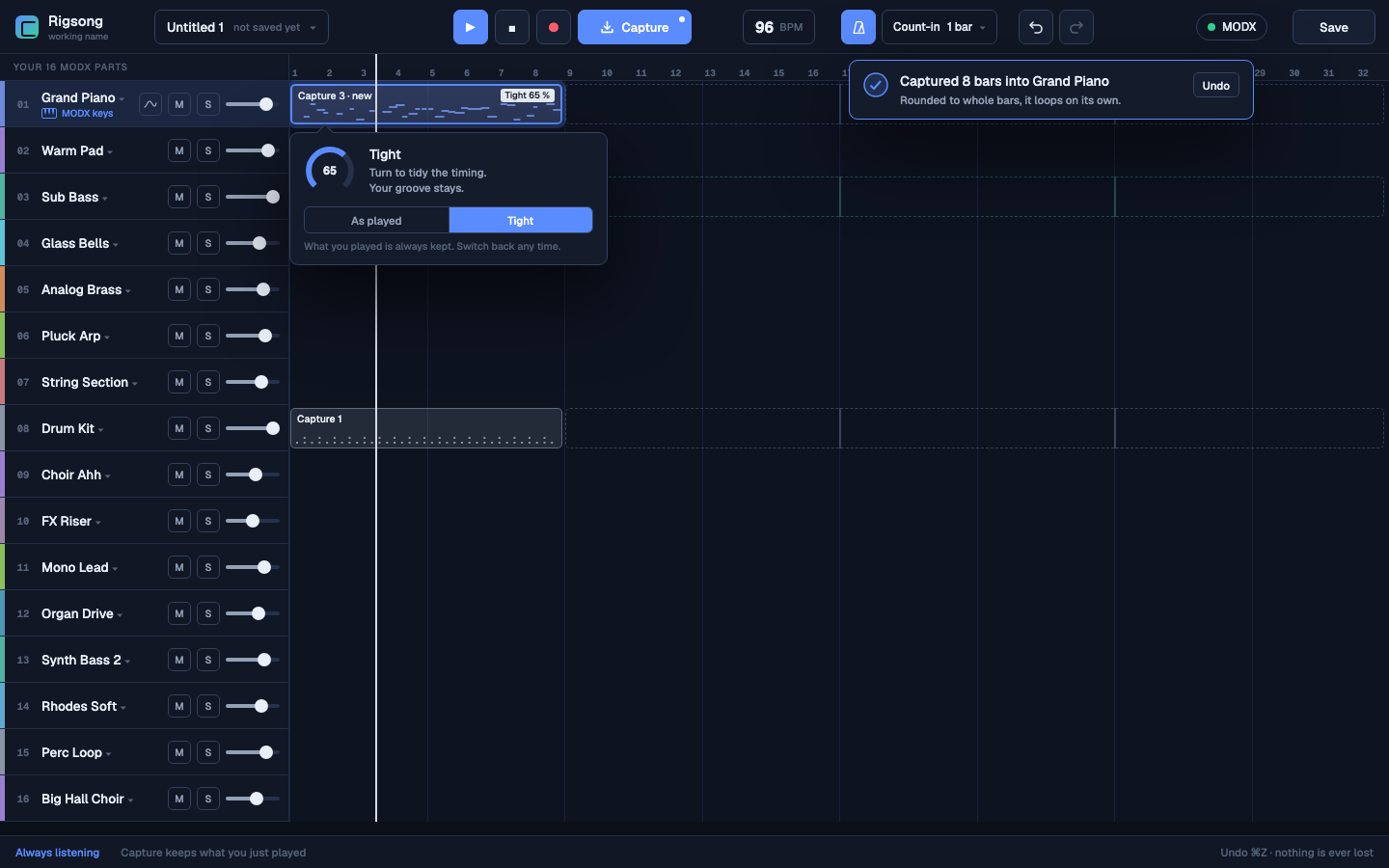
  • Tight tidies the timing by however much you ask — 0 % to 100 %.
  • As played is always kept. Switch back any time; nothing is thrown away.
  • Count-in before recording, and a metronome locked to the same clock as the notes.
MODXNO Capture: eight bars captured, with the Tight dial at 65 %
Captured eight bars. Tight at 65 %. Undo is one key away.
Mixer & Save

Save keeps everything.
Not just the notes.

The mixer moves the MODX itself — volume, pan, reverb send, variation send, and the two Performance effects. Every move is a Parameter Change sent down the cable, so your mix lives in the MODX, not in a copy of it. Then Save writes the whole Performance next to your song.

16Parts mixed, one column each
83 335Bytes of Performance kept with the song
1 177Blocks sent back on load
0Bytes different after a round trip
Checked on a real MODX, not on paper. A full Performance was saved, changed on the synth, sent back and read again — identical byte for byte. Reopen a song next month and the MODX comes back exactly as you left it.
Export

Send someone the sound,
not a MIDI file.

Export plays your song and records what comes back out of the MODX, over the same cable. What you get is the synth's own sound — the Performance, the effects, the mix — as an MP3 anyone can play. Drop it in a message, mail it to the singer, keep it as a rough mix.

It takes as long as the song. The MODX plays it in real time while MODXNO records — a two-minute song takes two minutes, and the app asks you not to touch the synth while it runs.
When something goes wrong

It tells you,
in plain words.

Pull the cable mid-session and MODXNO says so, in a sentence anyone can read, and tells you what happens next. Your song is safe. Plug the MODX back in and it gets its sounds back by itself.
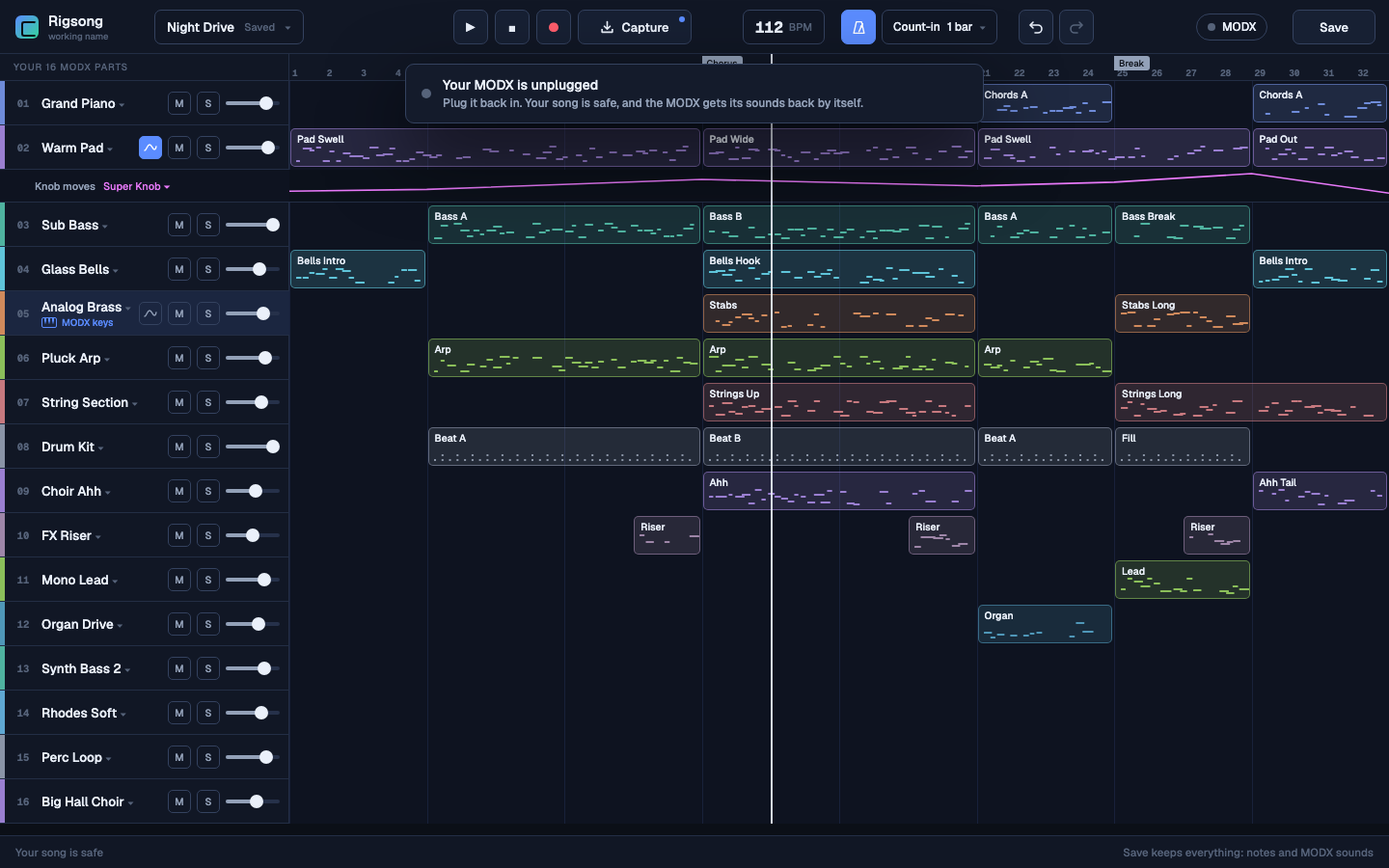
  • One status light next to the Save button: green when the MODX is in sync.
  • It only speaks when something is wrong. No log, no codes.
  • Undo everywhere — nothing you played is ever lost.
MODXNO telling the player the MODX is unplugged and the song is safe
"Your MODX is unplugged. Your song is safe."
What you need

A MODX and a USB cable.

Synth

A Yamaha MODX, connected to the computer over USB.

One setting

On the MODX: [UTILITY] > Settings > MIDI I/O, set MIDI IN/OUT to USB.

Computer

A standalone app for macOS. No DAW, no plugin host, nothing else to install.

Nothing stored on the synth

MODXNO never writes to the MODX's memory. Your Performances stay where you put them.

Pre-orders open · one price · no subscription

Your MODX, finally
worth sitting down to.

€49
One-time payment · Standalone app for macOS
  • 16 tracks, one per MODX part
  • All 2,227 MODX sounds in a menu
  • Arrangement timeline and note editor
  • Capture and Tight
  • Full MODX mixer, sent to the synth itself
  • Save keeps the notes and the whole Performance
  • Export your song as an MP3
  • Updates included
Pre-order — €49

Not on sale yet. Tell us you want one and we'll come back to you with the date and how to get it — nothing to pay today.